
You open a new tab, search for machine learning courses, and find 40 tabs of options before lunch. That is the old way: collect courses, start three, finish none.
Here is a fixed order of eight courses that costs $231 and fits into 24 weeks at five hours a week. You start with basic Python loops and functions and high-school statistics.
By the end you have two or three runnable projects and one credential that shows up in hiring screens. No calculus refresher is budgeted, and six of the eight courses are free to take.
The Plan at a Glance
1. AI for Everyone: The Six-Hour Free Start

Start with DeepLearning.AI's AI for Everyone on Coursera. It is free to audit, built for beginners, and takes about six hours. You write no code. It explains what machine learning and generative AI are and where they fit in a business.
The $31 certificate is optional, and it is the first line of the $231 total. Pay for it only if you want the credential on a profile. The knowledge arrives either way.
Skip it if you already ship models or have taken any machine learning course. Otherwise, after six hours you can open every other course on this path and read its description without translating the vocabulary first.
💡 Tip: Audit the course first. Pay the $31 for the certificate only if you want a line on LinkedIn or a receipt for your budget.
| Course | Cost | Time to finish | What you can do after |
|---|---|---|---|
| AI for Everyone (DeepLearning.AI) | $0 audit / $31 certificate | About 6 hours | Read ML papers and job posts without translating terms |
| Introduction to AI in Azure (Microsoft) | $0 | Just over 10 hours (14 modules) | Use a real cloud ML workspace without a bill |
| AWS Fundamentals of ML and AI | $0 | About 1 hour (1 module) | Know which AWS ML services exist |
| Practical Deep Learning for Coders (fast.ai) | $0 | Self-paced (weeks) | Train your own image classifier |
| Neural Networks: Zero to Hero (Karpathy) | $0 | Self-paced (weeks) | Write a GPT and a tokenizer from scratch |
| Hugging Face LLM Course | $0 with certificate | Self-paced (days) | Fine-tune and share a model under your name |
| Retrieval Optimization (DeepLearning.AI + Qdrant) | $0 | 1 hour | Tune a RAG app's retrieval for speed and cost |
| Google Cloud Professional ML Engineer exam | $200 | Exam day | One credential hiring screens recognize |
2. Microsoft's Free Azure Path: 14 Modules

Reading about deployment is the tedious part of this stretch. Clicking around a machine learning platform you never pay for is the fix, and Microsoft's Introduction to AI in Azure is the free way in. Fourteen self-paced modules run a little over 10 hours.
The labs happen inside Microsoft's own ML workspace, so you drag data in and watch a model train on rented hardware that costs nothing. If your employer never touches Azure, treat the modules as concept revision and not job training.
You finish with a trained model and a workspace you actually operated. That is the gap between reading about deployment and having done it once with your own hands.
💡 Tip: Do the labs in order. Skipping the workspace setup module makes every later lab a guessing game.
⚠️ COMMON MISTAKE
Don't Buy Cloud Credits Yet
Microsoft's path and the AWS one-hour course are free. Set a spending limit on any paid cloud account before you connect a billing card, and keep your first month on the free tier only.
3. AWS's One-Hour Machine Learning Orientation

Do not mistake a one-hour orientation for cloud training. AWS Fundamentals of Machine Learning and Artificial Intelligence is a single self-paced module, free, built for non-specialists who already use AWS at work, not for someone learning to code.
If you book it as your cloud course, you finish an evening short and still cannot deploy anything.
The safe way to use it: open a browser, sign in to a free AWS account, and follow the module's tour of the service list. Note which service does what as you go. One evening, done.
By hand, working out which AWS machine learning services exist and what each is for takes about three hours of reading pricing pages and product docs.
The module answers the same question in one hour, and checking your notes against the console takes ten more minutes.
One evening: about 60 minutes of module plus 10 minutes of note-checking, against roughly three hours of docs on your own.
💡 Tip: Watch it the same evening as the Microsoft Azure path. The two together give you a cloud vocabulary without a bill.
4. fast.ai: A Working Image Model in Lesson One

Prompt to copy
I am on lesson one of fast.ai Practical Deep Learning for Coders and have trained an image classifier that sorts photos into two folders. Write me a five-line plain-English explanation of what the model did, why it still gets some photos wrong, and one thing to try next, assuming I know Python loops and functions but no calculus.
Paste that into ChatGPT or Claude when the lesson finishes and the model has scored itself. It comes back in under a minute and gives you the words for what you just built.
Knowing which cloud services exist is not the same as having built anything, so this is the fastest point in the plan where you own a working model instead of a catalog.
That's the API point in practice. An API is a set of commands one program uses to call another, and fast.ai Practical Deep Learning for Coders, free from Jeremy Howard, has you calling one in lesson one.
You train an image classifier without deriving the math on paper first. Expect to run code, break it and fix it.
The catch: you use the commands before you understand what they hide. If that discomfort stops you at lesson two, run Andrej Karpathy's series alongside rather than after.
Push through and you have a classifier you trained yourself, the first item with a demo link, next to AI side hustles in a portfolio an employer can click.
🗺️ Run the Eight Courses in This Order
Week 1–2: AI for Everyone
Six hours of vocabulary, free to audit or $31 for the certificate.
Week 3–4: Microsoft Azure path
14 free modules, just over 10 hours, hands-on with a real ML workspace.
Week 4: AWS one-hour orientation
One free module to map the AWS ML services before you need them.
Week 5–10: fast.ai
Free, top-down, and lesson one trains a working image model.
Week 11–16: Karpathy Zero to Hero
Free and bottom-up; write backpropagation, a GPT and a tokenizer yourself.
Week 17–19: Hugging Face LLM Course
Free with certificate; fine-tune and share a model under your own name.
Week 20: Retrieval Optimization
One free hour to tune a RAG app's retrieval for speed and cost.
Week 21–24: Google Cloud exam
$200 exam after a real project, the one credential hiring screens recognize.
5. Karpathy's Zero to Hero: GPT From Scratch
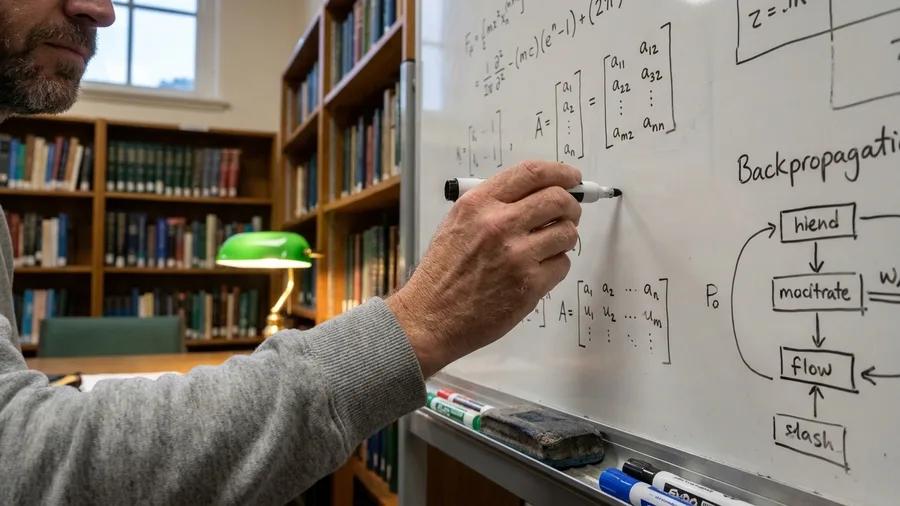
Four videos in, you write a small language model from an empty file, and it takes several weeks rather than a weekend.
Building on top of other people's commands leaves a gap: you can call a model but cannot say what it does inside.
Andrej Karpathy's Neural Networks: Zero to Hero is free and fills that gap from the bottom.
Step 1: Watch the backpropagation video and code the training loop yourself. That's the process that adjusts a network's numbers to reduce its error. You should see a tiny network learn a simple pattern and its error count fall each round.
Step 2: Build makemore, a character-level text generator, then a GPT from scratch. You should see it produce short strings of made-up names or text that slowly start to look real.
The catch: this is the hardest course on the path. It expects comfort with derivatives and matrix multiplication, and no calculus refresher is budgeted in the 24 weeks.
That math is the gate, so spread it over several weeks and expect to rewatch. Get through it and you can say you built a GPT and a tokenizer yourself, not just called one.
💡 Tip: Keep a bug log. Every shape error you fix teaches more than a clean run of the video code.
Jargon You'll Meet by Week 10
6. Hugging Face LLM Course: Fine-Tune and Ship
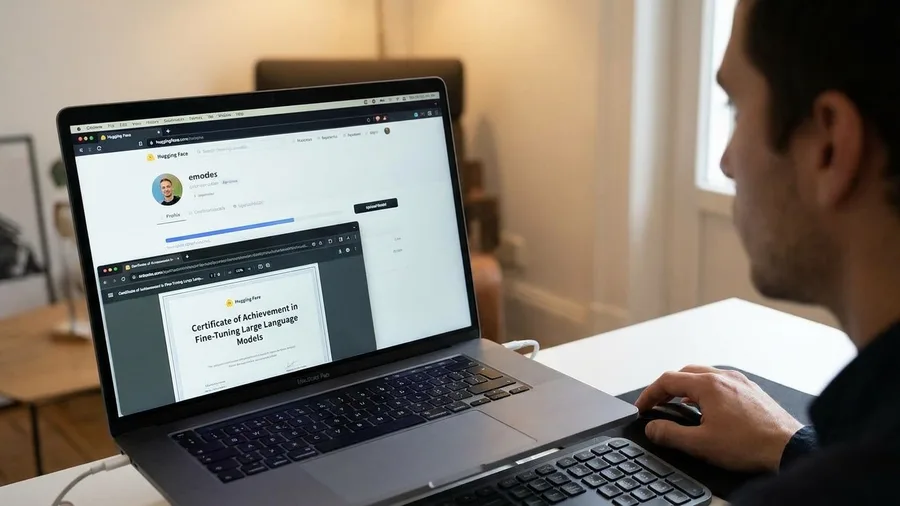
You finish with a fine-tuned language model and a certificate under your own name. The Hugging Face LLM Course gets you there free, taught by the people who built the toolkit.
A large language model is the kind of system behind ChatGPT, trained on huge amounts of text to predict what comes next.
Expect to bring PyTorch familiarity, so this comes after fast.ai or Karpathy, not before. Knowing how a model works inside makes fine-tuning a practical next move. The course covers tokenizers, the transformers library, fine-tuning and sharing, and issues its own certificate.
The catch: what you can host and share for free changes, so check Hugging Face's own pricing page before planning a public demo. Uploading means handling a key.
An API key is a private password that lets code call a service, and it never belongs in code you share.
Total: $0 in fees and roughly 20 to 30 hours of evenings, spent on lessons and debugging. What you walk away with is a portfolio item, not a line on a CV.
Fine-Tuning: Do It Now or Wait
Do it now
- Week 15 or later in the 24-week order
- At least 1 model trained end to end in Karpathy
- A dataset of 500 to 5,000 rows you can label
- Checkpoint planned before week 19
Wait
- Before week 12, with no model trained yet
- Budget touches $200 exam fee first
- No labeled data, only reading about fine-tuning
- Portfolio needs shipped work within 2 weeks
7. The One-Hour RAG Retrieval Tune-Up

A retrieval demo slows down when the same question pulls too many document chunks, and one evening can fix that. DeepLearning.AI made a one-hour beginner course with Qdrant for exactly this job, and it is free. Kacper Łukawski of Qdrant leads it.
The course walks through tokenization, then shows you how to measure whether retrieval quality is good. It finishes on tuning the HNSW settings and vector quantization that control speed and memory in a RAG app.
It assumes basic Python and a RAG app of your own to tune. Without a project, the hour becomes theory you forget in a fortnight.
For this reader, checking retrieval quality is the piece most side projects skip. A tuned demo answers faster and costs less to run, which is what a portfolio reviewer notices.
8. Google Cloud's $200 Machine Learning Exam

Prompt to copy
I am preparing for the Google Cloud Professional Machine Learning Engineer exam. Here is my project: [paste a two-paragraph description of the model, the data, and how it is deployed]. Ask me ten production ML engineering questions this exam would likely cover, one at a time, and wait for my answer before the next. After each answer, tell me what a strong answer would include that mine missed.
That prompt is one useful setup: a free practice partner you can reuse for any project. The exam itself costs $200, and the lessons in Google Cloud's machine learning and AI learning path are free to open.
It is an exam, not a course. It tests production ML engineering, so sit it after a real project ships. The $200 is gone whether or not you pass, and the fee, retake terms and exam guide sit on Google Cloud's certification page.
Keep the projects honest: check every fact, figure and link an AI assistant helps draft before it enters a portfolio. With the $31 certificate, the plan totals $231, leaving $19 of the $250 budget.
The 24-Week Path — At a Glance
📅 Total weeks
24
⏰ Hours per week
5
💰 Total spend
$231
📂 Projects by end
2–3 runnable
🏅 Credential
1 recognized
Budget left
$19 remains from the $250 budget after the $31 certificate and $200 exam fee.
Frequently Asked Questions
Do I need calculus for this path?
No calculus refresher is budgeted. Karpathy's course expects comfort with derivatives and matrix multiplication, but fast.ai and the cloud courses do not. If the math blocks you, run fast.ai first and revisit Karpathy later.
How much does the whole plan cost?
The eight courses total $231: $31 for the AI for Everyone certificate and $200 for the Google Cloud exam. Six of the eight courses are free to take, leaving $19 from a $250 budget.
Can I skip the free courses and go straight to the $200 exam?
You can, but you will likely fail. The exam tests production machine learning engineering. Sit it after fast.ai, Karpathy and at least one real project, and read the current exam guide first.
What if I already know Python but not machine learning?
Start with AI for Everyone anyway. Six hours of vocabulary makes the next seven courses readable. Then move to the Azure path for hands-on cloud exposure before fast.ai.
Is a certificate enough to get hired?
No. The plan produces two or three runnable projects and one credential. Hiring screens look for projects you can explain and code you can defend. Every fact and link an AI assistant helps draft is checked before it goes in a portfolio.
How do I fit five hours a week around a job?
Block two evenings of 2.5 hours each, or one weekend morning of five hours. One course at a time, in the order above. Do not start the next course until the current one is finished.
Block Five Hours And Start The Python Course
Pick by situation. No machine learning code yet, start with AI for Everyone. Can code and want a visible result fast, go to fast.ai.
Want to build with language models, take Karpathy then Hugging Face. Want the credential, sit Google Cloud's $200 exam last, after a real project.
Five hours a week, 24 weeks, $250: this order spends $231, leaves $19, and runs one course at a time. Two or three runnable projects with checked facts in a portfolio, plus one recognized credential, beat a folder of half-finished courses.
So block five hours this week and open the six-hour free AI for Everyone course. Not the $200 exam page.